

How To Create Your Own Sims 3 World

This is how I setup a custom world in The Sims 3, starting from scratch and building up my world from nothing (similar to my Sims 2 method).
This is NOT a tutorial on using Create-a-World (CAW). In this guide, I use a premade empty world and populate it with Sims for rotational gameplay. You could also use this guide if you play with story progression, but want a custom world filled with your own Sims.
Installing an Empty World
The first step is installing an empty world.
My favorite is Deery Meadows if you want to build everything yourself or Redwood Harbor if you want all the rabbit holes and houses already built. My Sim Realty has several very high quality empty worlds you can choose from.
You can also make your own empty world if you're familiar with CAW. Sometimes I just want to play instead of building for weeks at a time, so I appreciate premade empty worlds.

Once you've installed your empty world, load your game, create a new game, and you're ready to get started!
Creating Households
I create a total of 24 single, young adult Sims – 12 males and 12 females.
I prefer to create single Sims and then allow them choose their own partners in-game based on attraction. You could also create couples or families at this point if you prefer. But I find that 24 Sims is just about right for starting out a new world.
Here are the steps I take to create my Sims:
- Click the "Randomize" button once. I keep the body modifier sliders exactly as they are after randomizing. This gives me a greater variety of body shapes.
- Click the "Randomize Name" button. I keep whatever name I get unless it doesn't make sense due to race/ethnicity (or I just hate it). Usually I can get a decent name in a few clicks. A better name generator is Namey – if you don't want to use the in-game randomizer.
- Set appearance. I prefer to create Sims with a wide variety of hair, eye, and skin colors for better genetics. See my chart below if you want to get really technical.
- Choose clothing for all outfits. I use the Sim's favorite color to help me choose clothing.
- Choose Lifetime Wish. I go to the Sims Wiki page on LTWs and choose 24 base game wishes that I like – mostly career based for the first generation but a few skill-based too (see chart below). You could also roll a random LTW if you have a hard time choosing.
- Choose Traits. I look on the Sims Wiki page on LTWs and give my Sims the key traits for their lifetime wish. If there are any trait slots left, I randomize their additional traits.
- Choose favorites. I choose favorite color based on the color the Sim is wearing. I usually keep the randomized favorite food and music preference unless it really doesn't suit the Sim.
If you want to get really technical about creating your Sims (like I do), here is the chart I used to create my version of Redwood Harbor.

You can download a copy of my planning spreadsheet from Google Drive here. I removed the names and favorite colors so you can customize them yourself. I left the LTWs and traits in case you want to use mine. If not, just delete that too.
After all 24 Sims are created, I leave them in the Sim Bin while I create their homes. I usually create all my male Sims first and then all my female Sims second, but that doesn't really matter.
Moving in Sims
To make my first round easier, I try to move Sims in together whenever possible. Roommates make for a shorter first round – something I learned the hard way from playing Knutley where all Sims are in a single household.
In Redwood Harbor (the world I'm using), there are several 2- and 3-bedroom homes, so I moved groups of males and females in together.
I roll to randomly decide who lives where. For example, I choose a 3-bedroom house. Then I roll 1 – 12 to find out which of my 12 male Sims will move in first. Next, I roll a number between 1 -11 to choose who moves in next. And finally, I roll a number between 1 – 10 to decide the final roommate.
I repeat this formula until all Sims are moved in. I focus on 3-bedroom (or larger) homes first, so I can move as many Sims in a single household as possible. But ALL Sims must have their own private bedroom.
Free Real Estate
Since all Sims are created as singles in CAS, they may not have enough money to move in to the home I've chosen for them. In this case, I use the "free real estate" cheat to move them in. Here's how to use it:
- Press Ctrl + Shift + C to open up the cheat window, and type in "testingcheatsenabled true" without the quotation marks.
- Press Ctrl + Shift + C again to re-open the cheat window. Type freerealestate.
- Move in Sim. All real estate is now free.
After moving in my Sims, I then set their starting funds. I'm definitely not leaving them with $16,500+ to start their lives with because I don't think that's very much fun. I like my Sims to start poor and move up from the bottom.
Starting Funds
I roll a number between 1 and 5,000 to determine each Sim's starting funds. I use the Online Banking Mod to open individual bank accounts for my Sims so they can keep their money separate while still living with roommates.
When bills are due, each Sim withdraws their portion and transfers to the household funds. I divide the bills equally between all residents. If there are three roommates on a lot, for example, each Sim pays 1/3 of the total bills when they're due.
University Degrees
I also cheat my Sims a University Degree if their LTW is for a career that I feel would require one. I check the Sims Wiki Major page to choose the degree related to the Sim's chosen career, if applicable. I use the Nraas Debug Enabler to cheat a college degree:
- (Click on Sim) > Nraas > Debug Enabler > Options: Smartphone > Academic Degrees > Choose Degree
I roll a number between 1 and 4 to decide if the Sim graduated with an A (1), B (2), C (3), or D (4). I always choose 100% completed.
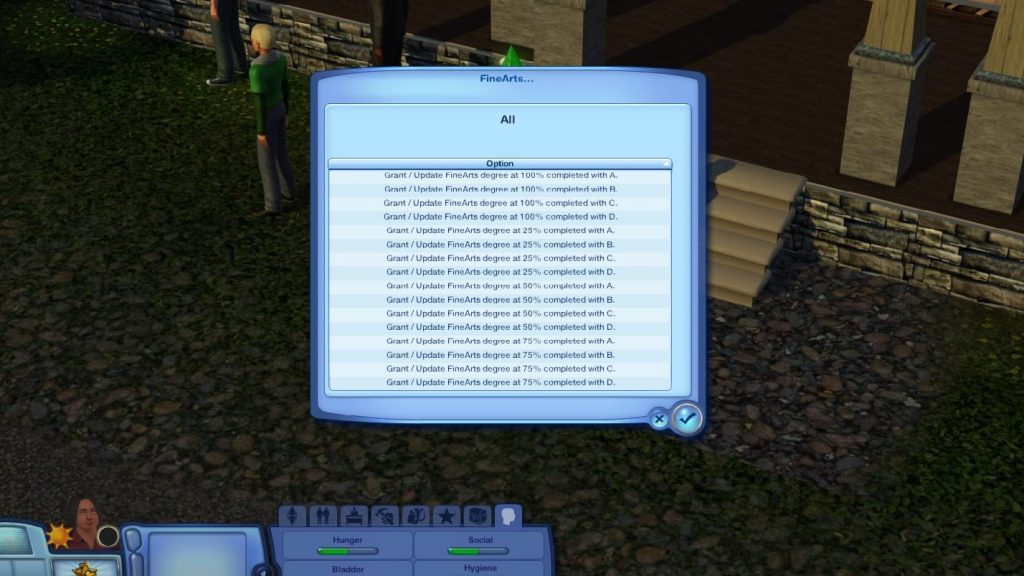
After cheating a degree, you'll be prompted to choose an additional trait for your Sim. I click the randomize button and take the first trait that does not conflict with one of my Sim's current traits.
I'm working on a Caste System using Nraas Story Progression that will disallow Sims to progress further in their careers without a degree (post on that coming soon). So I cheat my founding Sims degrees and pretend they've already graduated.
Gender Preference
Next, I set my Sims' gender preferences. I am now creating ALL Sims in a new world as bisexual. This gives my Sims more choices for partners and allows them to choose if they want to be in a same-sex or an opposite-sex relationship.
To set gender preference, I use Nraas Master Controller:
- (Click on Sim) > Nraas > Master Controller > Intermediate > Gender Preference
I set everyone's preference for both males AND females to 100. Now, my Sims can choose whoever they like best as a partner and I don't have to worry about if there are enough gay/lesbian Sims.

Mods & Rules
I setup my worlds to play rotationally using these settings. I setup the additional NRaas mods with these settings. Then, I'm ready to play!
I start with the first household that I moved in and rotate through the neighborhood in order of the households I created. I play using my Sims 3 gameplay rules, which are a constant work in progress. I plan to add so much more to these rules as a I play through Redwood Harbor, so check back soon!
If you'd like to see me play Redwood Harbor live, come join me on Twitch! I stream The Sims 3 on Wednesdays at 2:00 PM MT.
How To Create Your Own Sims 3 World
Source: https://pleasantsims.com/custom-world-sims-3/
Posted by: thomsdreasockinly.blogspot.com
0 Response to "How To Create Your Own Sims 3 World"
Post a Comment